ai canvas / image · video · audio
The AI canvas where you direct the shot and finish the cut.
Yantra Canvas is an AI creative studio on one board. Generate image, video and audio side by side, set the camera and the light before you spend a run, and edit the result with an AI agent beside you.
● inside yantra
What you get.
Direct the shot
Set genre, era and tempo in Film setup, then choose the camera, palette and lighting. Every choice shows up on the monitor before you spend a run.
Text to video and image to video
Describe a scene or start from a still and generate clips with leading AI video models. Character and Product references keep the same face or product from shot to shot.
Images, music and voice
Generate images from a prompt or a reference, then add music, speech and sound from the same place, so the whole piece comes off one board.
An AI agent beside the board
Describe your idea and images, video and audio land on the canvas. Select anything and ask for a change in plain words.
AI video editor and AI photo editor
A video editor with timeline, captions and music, a photo editor for crop, filters and background, an audio editor to trim, fade and mix, and AI cut to edit footage with a script.
Shorts, product videos and slides
Turn long videos into short clips, promote a product with an AI marketing video, or build a presentation from a topic.
AI storyboard generator and shot sheets
Build a nine-panel storyboard from one frame, lay out nine shots of the same scene, or write a short story and get one frame per shot.
AI presenters, 3D scenes and screen recording
Create an on-camera host, arrange a 3D scene and render it, build a mood board from references, or record and polish your screen.
● how it works
How to make a video or image on Yantra Canvas
Start from a prompt, a file or a template
Open a blank canvas, drop in your own media, or pick a template and use its prompt as your starting point.
Direct it
Choose image or video, add a Character or Product reference, and set the film setup, camera, palette and lighting.
Refine it on the board
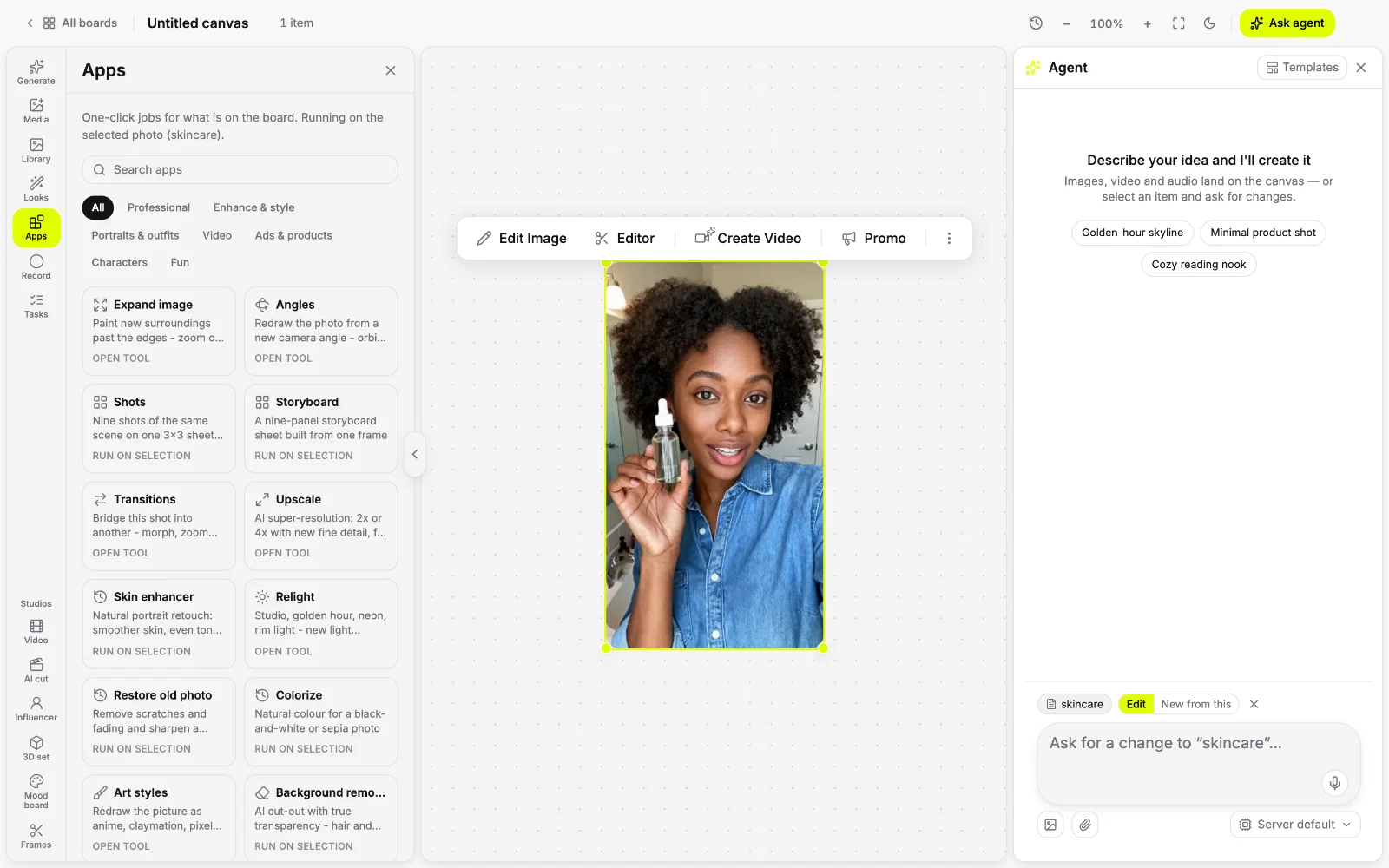
Select a result and ask the agent for a change, run a one-click app, or open it in the video, photo or audio editor.
Finish it
Export the finished cut or download the file. Your canvases are saved, so you can come back and keep going.
● apps
43 one-click apps.
Select a photo or clip and run a job: an AI upscaler, a background remover, lip sync, video translation and more.
Professional
Expand image
Paint new surroundings past the edges - zoom out or widen to a new shape
Angles
Redraw the photo from a new camera angle - orbit, tilt, zoom
Shots
Nine shots of the same scene on one 3x3 sheet, wide to close-up
Storyboard
A nine-panel storyboard sheet built from one frame
Transitions
Bridge this shot into another - morph, zoom through, smoke - and join them
Upscale
AI super-resolution: 2x or 4x with new fine detail, for stills and clips
Enhance & style
Skin enhancer
Natural portrait retouch: smoother skin, even tone, same person
Relight
Studio, golden hour, neon, rim light - new light without a reshoot
Restore old photo
Remove scratches and fading and sharpen a damaged photo
Colorize
Natural colour for a black-and-white or sepia photo
Art styles
Redraw the picture as anime, claymation, pixel art and 23 more
Background remover
AI cut-out with true transparency - hair and soft edges kept
Magic eraser
Name an object, person or text and it is removed, the gap filled
Portraits & outfits
Headshot generator
A selfie redrawn as a studio headshot: plain backdrop, soft key light
Outfit swap
Dress the person in a garment from a second photo, pose kept
Editorial shoot
The person redrawn in a high-fashion magazine shoot
90s yearbook
A 1990s school yearbook portrait of the person
Video
Photo effects
198 effect scenes - hugs, wings, dances, bullet time - from one photo
Motion control
The person in the photo performs the moves of a reference clip
Talking photo
The face in a still speaks a line you type or audio you have
Recast
Put your people or products into a clip, keeping its motion and sound
Lip sync
Re-time the mouth in a clip to a new line
Translate video
Re-voice the speech in a clip in another language, with optional lip-sync
Music for video
Instrumental music written to the clip's length, laid under its sound
Day to night
A 5-second clip of the scene turning from day to night
Ads & products
Product shot
A plain product photo turned into a clean studio shot
Product in a scene
Place the product in a scene you describe, lit to match
Bullet time spin
A 5-second 360° bullet-time clip around the subject
Billboard ad
The picture placed on a giant billboard over a busy city street
Poster ad
The product redrawn as a bold advertising poster, no text added
Characters
Character builder
Pick a look - type, hair, style, features - and get a character still to reuse
Photo dump
One character still becomes a set of new scenes - travel, gym, night out
Story frames
Write a short story and get one frame per shot, each drawn from the last
3D figure
The person as a collectible 3D figure on a desk, box behind
Plushie
The subject redrawn as a soft plush toy
Game character
The person as a stylised 3D video-game hero render
Life sim
The person as a cheerful life-simulation game character
Anime character
The person as a hand-drawn anime character
Fun
Micro-beasts
The person surrounded by tiny, cute animals
Street mural
The picture painted as a mural on a brick wall
Retro paint app
The picture redrawn as 1990s paint-program art
Cloud surf
The person surfing a dreamy pink cloud sea
Stage idol
The person on a concert stage under spotlights
● try asking
Start with one prompt.
Pick one and it lands in the composer, ready to send.
● questions
Asked often.
What is an AI canvas?
An AI canvas is a board where you generate, arrange and edit media with AI instead of switching between separate tools. Yantra Canvas holds images, video and audio side by side, with an AI agent beside the board that can make new work or change what you select.
What is the best AI creative studio?
The best AI creative studio takes you from an idea to a finished piece in one place. Yantra Canvas generates image, video, music and voice with leading AI models, lets you direct each shot, and adds editors and one-click apps, so it works as a full AI creative suite rather than a single generator.
Can I turn a photo into a video?
Yes. Start from a still and describe the motion, and Canvas generates the clip. Apps such as Motion control, Talking photo and Photo effects animate a photo in one click.
Can Canvas keep the same character across shots?
Yes. Add a Character or Product reference and Canvas uses it in each generation. Character builder makes a character still you can reuse, and Story frames draws each new frame from the last one.
Is Yantra Canvas free to try?
Yes. The free plan includes daily AI credits and needs no card, and Canvas spends those credits when it generates. Paid plans add more credits and features.
Do I need editing experience?
No. Ask for the change in plain words or run an app in one click. The timeline, photo and audio editors are there when you want finer control.
● also in yantra
One assistant, every job.
- AI assistant
Instant answers, deep research and an agent that finishes the job.
- AI messaging
Text your assistant on iMessage, WhatsApp, Telegram, Slack and Discord.
- AI video generator
Text to video, image to video, voice-over, subtitles and edits.
- AI voice generator
Text to speech, voice cloning, transcription and voice-overs.
- AI image generator
Text to image, photo edits, posters and decks on one board.
- AI website builder
Describe the site, watch it build beside the chat, publish it.
- AI browser agent
An agent that uses a real browser - in the cloud or your own tabs.
- AI ad generator
Ad creative from a prompt, then launch and track the campaign.
- AI content generator
Posts, emails, images and video for every channel.
- AI ticketing system
Issues, boards and triage for teams and their AI agents.
- AI coding agent
Codezen: cloud sandboxes that code, test and open pull requests.